

2·
8 days agoYeah, it’s pretty well hidden. I wasn’t aware of it for the longest time either, and just happened to stumble across it myself.
Yeah, it’s pretty well hidden. I wasn’t aware of it for the longest time either, and just happened to stumble across it myself.
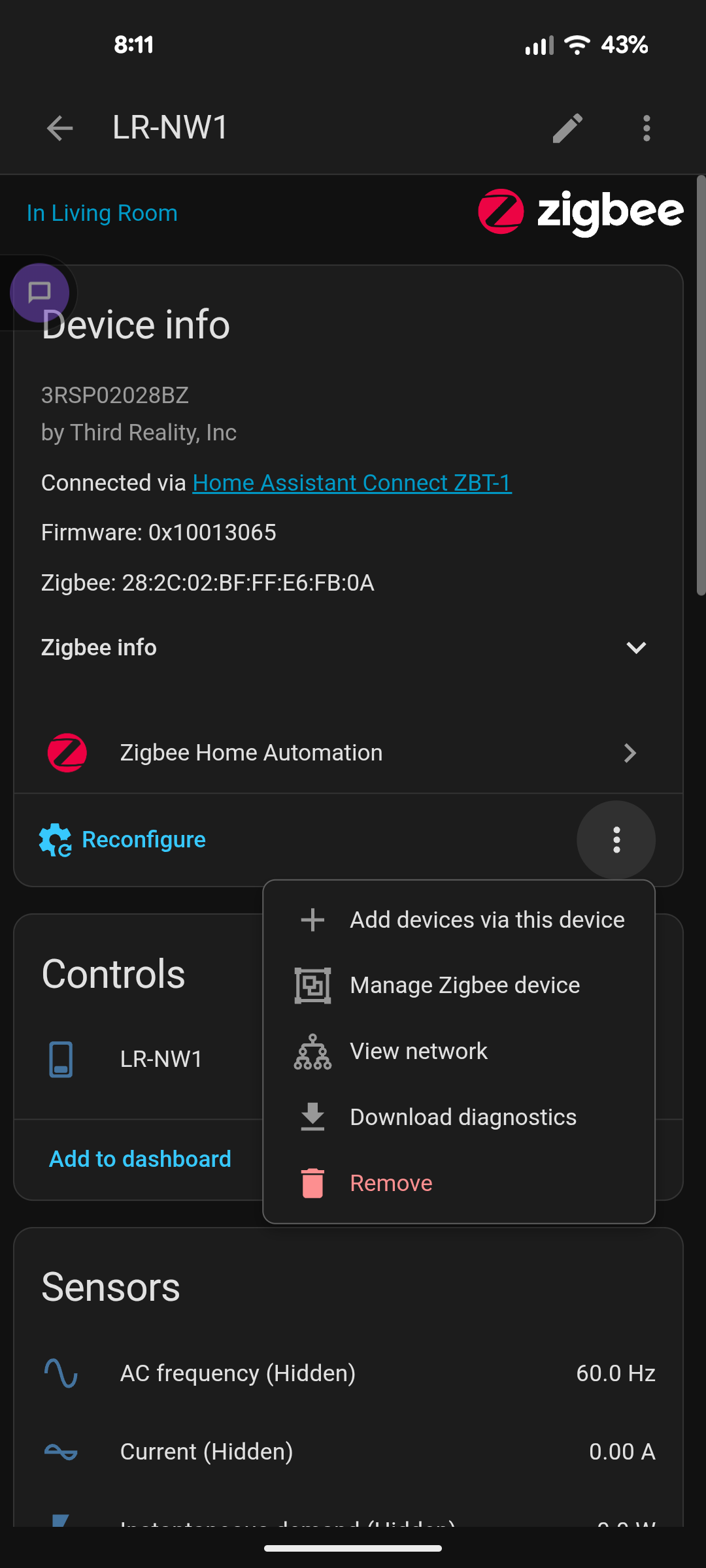
Nope, zha. Tap on Settings, then tap Zigbee, then tap Devices, and then tap a repeater. Next to the button that says Reconfigure, is a 3.Vertical menu. And if you tap on that 3.Vertical menu, there’s an option that says Add Devices via this device.
Zigbee has an analyzer where you can see how the connections are being made and you can actually remove the sensor from your network and then force it to reconnect to the network using a specific repeater. I’ve noticed by default that everything seems to want to connect to my ZBT1, but if I want to connect something specifically through my smart plug repeater, I have to open the home assistant app and then tap on the plug and then tap add via this device in a three dot menu…
You have two options. Either put Linux on it and run Windows in a virtual machine, or buy a second laptop that you only use for work. Because if your university requires monitoring spyware, then you don’t need to be working and doing your studies on the same device.
You do personal stuff on a personal machine. You do work stuff on a work machine. And you do educational stuff on an educational machine. If you don’t want to buy three physical machines, then VMs are your next best bet.